
Team and Player Possession#
Knowing which team has possession at a certain point provides crucial information about the game. Of course, the overall ball possession is interesting, but seeing this ball possession over time might be more intuitive. On top of that, you can combine this data with the ball data to see where the team has most possession of the ball for furhter analysis. Besides team possession, you might be more interesting in individual player possession. You might now know when a player is involved in an event, but unaware if this player took a lot of time to perform this event, or if he was forced to do so. Besides, you can combine individual player possession with pressure to see which player handle pressure the best/worst.
Warning
Although we try to keep everything up to date, the code in this notebook might not perfectly align with the code in the package. If you find any bugs or have any suggestions, please let us know.
Team Possession#
Some tracking data providers, like Tracab, provide info about which team has possession of the ball during the game. You could sometimes question the accuracy of this data but at least it is a good place to get started with. However, this is not the case for all data providers. By combining the tracking and event data, you can make a calculated guess about which team has possession of the ball. For instance, if the home team performs a successfull pass at frame 0, you can be quite certain that the home team is in ball possession. This possession probably holds untill the other team makes a successful on-ball event (pass, dribble, shot). Lets see how we can compute this in some code.
import pandas as pd
from databallpy.utils.constants import MISSING_INT

def add_team_possession(
    tracking_data: pd.DataFrame,
    event_data: pd.DataFrame,
    home_team_id: int,
    inplace: bool = False,
) -> None | pd.DataFrame:
    """Function to add a column 'ball_possession' to the tracking data, indicating
    which team has possession of the ball at each frame, either 'home' or 'away'.

    Args:
        tracking_data (pd.DataFrame): Tracking data for a game
        event_data (pd.DataFrame): Event data for a game
        home_team_id (int): The ID of the home team.
        inplace (bool, optional): Whether to modify the DataFrame in place.
            Defaults to False.

    Returns:
        None | pd.DataFrame: The tracking data with the 'ball_possession' column added.
    """
    if not inplace:
        tracking_data = tracking_data.copy()

    on_ball_events = ["pass", "dribble", "shot"]
    current_team_id = event_data.loc[event_data["databallpy_event"].isin(on_ball_events), "team_id"].iloc[0]
    start_idx = 0
    tracking_data["ball_possession"] = None
    for event_id in [x for x in tracking_data.event_id if x != MISSING_INT]:
        event = event_data[event_data.event_id == event_id].iloc[0]

        if (
            event["databallpy_event"] in on_ball_events
            and event.team_id != current_team_id
            and event.outcome == 1
        ):
            # Switch of teams
            end_idx = tracking_data[tracking_data.event_id == event_id].index[0]
            team = "home" if current_team_id == home_team_id else "away"
            tracking_data.loc[start_idx:end_idx, "ball_possession"] = team

            current_team_id = event.team_id
            start_idx = end_idx

    last_team = "home" if current_team_id == home_team_id else "away"
    tracking_data.loc[start_idx:, "ball_possession"] = last_team

    return tracking_data
Note
Looping over all events is of course not a computational fast way of doing this. However, the code still runs reasonably fast and it makes a clear example of how this function works. If you have any suggestions on how to change this code, please check the back-end code and open a pull request to vecotorize the computations.
In summary, we assume the team that has possession is the team that has done the last on-ball event. Now, there are a lot of nuances that are ignored in this oversimplistic function:
When a team gets possession, but the first event is not successful, they are not rewarded any possession. There is a choice here, either you give them possession even though they might not actually have had possession, or you only award a possession when there was at least 1 successfull event.
We are highly dependent on the quality of the event data and the synchronisation of tracking and event data for this function to work well. An assumption that might be violated by times.
The exact definition of team possession is not always clear, especially in ground and arieal duels, this of course influences the final result.
Having said all this, I think this is a valid point to get started for your analysis if the tracking data does not provide the team possession information in their data
Team Possession in DataBallPy#
In DataBallPy you can import the add_team_possession function from the features module.
from databallpy import get_game, get_open_game

game = get_game(
  tracking_data_loc="../data/tracking_data.dat",
  tracking_metadata_loc="../data/tracking_metadata.xml",
  tracking_data_provider="tracab"
  event_data_loc="../data/event_data_f24.xml",
  event_metadata_loc="../data/event_metadata_f7.xml",
  event_data_provider="opta",
)

# or get the open game provided by the DFL/Sportec Solutions
game = get_open_game()
Note
Please see Loading in a game for extra information and the supported providers
game.tracking_data["team_possession"]
0       away
1       away
2       away
3       away
4       away
        ...
8995    away
8996    away
8997    away
8998    away
8999    away
Name: team_possession, Length: 9000, dtype: object
game.tracking_data.rename(columns={"team_possession": "team_possession_original"}, inplace=True)
game.tracking_data.loc[:, "team_possession"] = None

# Synchronise your game if you have not done that yet:
# >>> game.synchronise_tracking_and_event_data()

game.tracking_data.add_team_possession(game.event_data, game.home_team_id)

print("Difference between tracking data and event-data based approach:")
print(
    game.tracking_data.loc[
        game.tracking_data["ball_status"]=="alive", ["team_possession", "team_possession_original"]
        ].value_counts()
)

print("\nFirst period where both approaches do not align:")
td_alive = game.tracking_data.loc[game.tracking_data["ball_status"]=="alive"]
print(
    td_alive[(td_alive["team_possession"]=="home") & (td_alive["team_possession_original"] == "away")].index[:100]
)
Difference between tracking data and event-data based approach:
team_possession  team_possession_original
home             home                        3614
away             away                        1684
home             away                         320
away             home                         274
Name: count, dtype: int64

First period where both approaches do not align:
Index([ 859,  860,  861,  862,  863,  864,  865,  866,  867,  868,  869,  870,
        871,  872,  873,  874,  875,  876,  877,  878,  879,  880,  881,  882,
        883,  884,  885,  886,  887,  888,  889,  890,  891,  892,  893,  894,
        895,  896,  897,  898,  899,  900,  901,  902,  903,  904,  905,  906,
        907,  908,  909,  910,  911,  912,  913,  914,  915,  916,  917,  918,
        919,  920,  921,  922,  923,  924,  925,  926,  927,  928,  929,  930,
        931,  932,  933,  934,  935,  936,  937,  938,  939,  940,  941,  942,
        943,  944,  945,  946,  994,  995,  996,  997,  998,  999, 1000, 1001,
       1002, 1003, 1004, 1005],
      dtype='int64')
Looks like both approaches generally align, but from frame 859 untill 1005 (~10 seconds) there are some differences. The event-data based approach thinks the home team has ball possession, while the tracking data provider indicates that the away team has ball possession. Generally, there are 2 things that could be going on:
The tracking data is wrong here. Tracking data is often acquired semi-automatically, and somethimes columsn like team possession are not switched as expected.
The synchronisation of tracking and event data did not go well, or the event/tracking data has substantial errors.
The definition of a ball possession does not align between our approach and that of the tracking data provider.
Lets visualize a game clip to see what is going on in this instance.
start_idx = 700
end_idx = 1250

print(
    game.event_data[
    (game.event_data["minutes"]==0) &
    (game.event_data["seconds"].between(start_idx/game.tracking_data.frame_rate - 2, end_idx/game.tracking_data.frame_rate + 2)) &
    (~pd.isnull(game.event_data["databallpy_event"]))
    ][["databallpy_event", "player_name", "is_successful"]]
)
   databallpy_event player_name  is_successful
15             pass      home_3           True
16             pass     home_10           True
22             pass      away_8          False
23             pass      home_5          False
from databallpy.visualize import save_tracking_video

save_tracking_video(
    game,
    start_idx,
    end_idx,
    os.path.join(os.getcwd(), "../static"),
    title="team_possession_difference",
    events=["pass", "dribble", "shot"],
    variable_of_interest=game.tracking_data.loc[start_idx:end_idx, "frame"]
)
Explaining the difference#
So we can see that the tracking data provider gives ball possession to the away (red) team from frame 859 untill at least 1005, while the event-data based approach gives this period to the home (green) team. Close to frame 859, away 8 performs a (unsuccessful) pass. Tracab seems to account this as a possession for the away team, while the current approach only acknowlegdes a switch in ball possession after a successful event. This it thus a difference in definition of ball possession. Interstingly, when home 5 performs an unsuccessful pass afterwards, the tracking data provider does not account this possession to the home team. It looks like somewhere there was a foul made, it is not exactly clear when this happens relatively to the passes, which might explain why the tracking provider did not switch the ball possession here.
You can call the add_team_possession method on the game.tracking_data class.
game.tracking_data.add_team_possession(game.event_data, game.home_team_id)
Arguments#
event_data (pd.DataFrame): The event data of the game.
home_team_id (int | str): The id of the home team.
allow_overwrite (bool, optional): Whether to allow to overwrite the current
"team_possession"column is it is not filled withNonevalues.
Conclusion#
However, overall, it seems like the event-based approach does corroberate with what the tracking data provides as indication of team possession. So, if you do not have any info of the tracking data regarding ball possession, or have reasong to suspect it is not that accurate, you can use this function from DataBallPy to compute it in a more algorithmic approach.
Individual Player Possession (Vidal-Codina et al. (2022))#
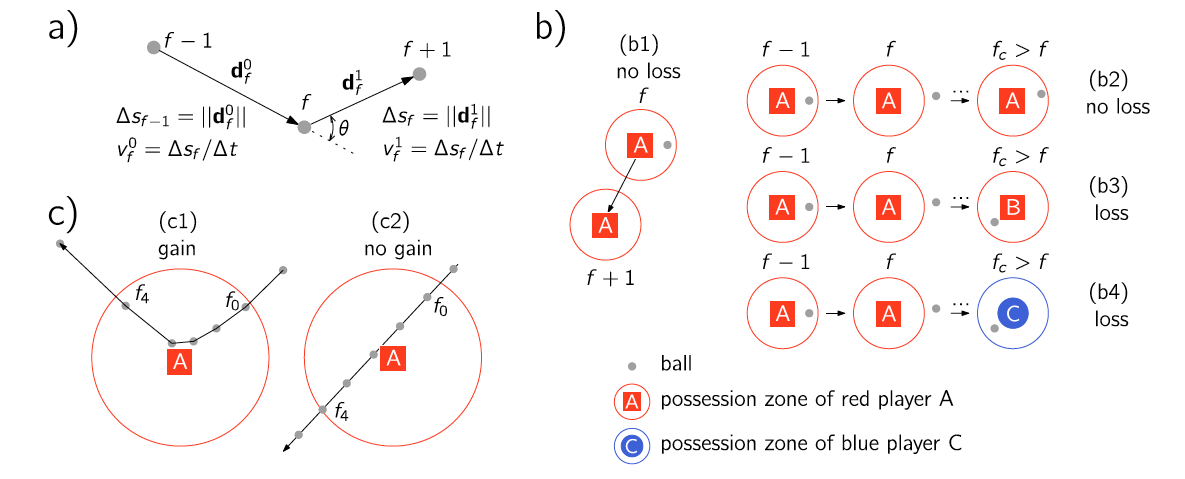
For the individual player possession we will look at an approach introduced by Vidal-Codina et al. (2022): “Automatic Event Detection in Football Using Tracking Data”. Although the overall idea of the paper is not to calculate which player has possession of the ball, it is an important preprocessing step for the machine learning they use afterwards. The approach uses only tracking data (x, and y coordinates) to assign which player has possession for each frame. Generally, the approach uses 3 different steps to find out how long a player was in ball possession:
Did the ball reach the player zone (PZ) of the player?
Did the player actually obtain possession the ball in this periods?
When did the player loose possession of the ball afterwards?
1. The Possession Zone (PZ)#
The possession zone is simply a constant. Once a player is within \(PZ_{radius}\) meters of player \(i\), a potential possession is awarded. If this condition is true for two players of the same team, the possession is awarded to the closest player. If this condition true for two players of the opposite team, it is assigned as a duel, but that it out of the scope of this notebook.
import numpy as np

def get_distance_between_ball_and_players(tracking_data: pd.DataFrame) -> pd.DataFrame:
    """
    Optimized function to calculate the distances between the ball and all players using vectorized operations.

    Args:
        tracking_data (pd.DataFrame): DataFrame with tracking data over which to calculate the distances.

    Returns:
        pd.DataFrame: DataFrame with the distances between the ball and all players.
    """

    player_columns = [col for col in tracking_data.columns if "_x" in col and "ball" not in col]
    ball_x, ball_y = tracking_data["ball_x"].values, tracking_data["ball_y"].values

    distances_df = pd.DataFrame(index=tracking_data.index)
    for col in player_columns:
        player_x, player_y = tracking_data[f"{col}"].values, tracking_data[f"{col[:-2]}_y"].values
        distances = np.sqrt((ball_x - player_x) ** 2 + (ball_y - player_y) ** 2)
        distances_df[col[:-2]] = distances

    return distances_df

def get_initial_possessions(
    tracking_data: pd.DataFrame,
    pz_radius: float,
    distances_df: pd.DataFrame = None,
) -> pd.Series:
    """
    Calculate initial ball possession based on proximity and duration within the possession zone (PZ).

    Args:
        tracking_data (pd.DataFrame): Tracking data with player positions.
        pz_radius (float): Radius of the possession zone in meters.
        distances_df (pd.DataFrame, optional): DataFrame with distances between the ball and players.
            Defaults to None.

    Returns:
        pd.Series: Player possession status for each frame.
    """
    if not distances_df:
        distances_df = get_distance_between_ball_and_players(tracking_data).fillna(np.inf)
    closest_player = distances_df.idxmin(axis=1, skipna=True)
    close_enough = distances_df.min(axis=1) < pz_radius
    return np.where(close_enough, closest_player, None)

initial_possession = get_initial_possessions(game.tracking_data, 2.5)
print(initial_possession)
['away_6' 'away_6' 'away_6' ... 'home_2' 'home_2' 'home_2']
For every frame we have now calculated which player is closest to the ball, and if that player is within the \(PZ_{radius}\) of the ball, we can say that player has potential possession of the ball. Seems like the away team had the kick off, and away_6 took it. Lets continue to the next step to see if this player actually has possession of the ball.
2. Ball Controll#
The first condition is not enough to find if a player has valid ball possession. For instance, if the ball flies over a player, that player did not have possession of the ball, although it might look like it on the tracking data. The athors proposed 2 conditions that could see if the player had actuall possession of the ball.
The ball changes from direction while in the possession zone of player \(i\)
The ball changes in speed while in teh possession zone of player \(i\)
Two new constants are added for this: \(BA_{threshold}\) and \(BV_{threshold}\). Here \(BA_{threshold}\) stands for the ball angle, so the difference in direction, and \(BV_{threshold}\) for ball velocity, so the change in speed of the ball. See also the image (C) below for a visual representation of the method.
from databallpy.features import get_smallest_angle

def get_valid_gains(
    tracking_data: pd.DataFrame,
    possession_start_idxs: np.ndarray,
    possession_end_idxs: np.ndarray,
    bv_threshold: float,
    ba_threshold: float,
    min_frames_pz: int,
) -> np.ndarray:
    """Function to check if, within a given period, a player gains possession of the
    ball. Possession is gained if the ball speed changes at least bs_threshold m/s or
    the ball changes direction (> ba_threshold) between the first and the last
    proposed possession frame.

    Args:
        tracking_data (pd.DataFrame): pandas df with tracking data over which to
            calculate the player possession.
        possession_start_idxs (np.ndarray): array with the starting indexes of the
            proposed possessions.
        possession_end_idxs (np.ndarray): array with the ending indexes of the proposed
            possessions.
        bv_threshold (float): minimal velocity change of the ball to gain possession
        ba_threshold (float): minimal angle change of the ball to gain possession
        min_frames_pz (int): minimal number of frames the ball has to be in the possession
            zone to be considered as a possession.

    Returns:
        np.ndarray: array with bools with if the player gained possession of the ball
        per possession.
    """

    ball_angle_condition = get_ball_angle_condition(
        tracking_data, possession_start_idxs, possession_end_idxs, ba_threshold
    )

    ball_speed_condition = get_ball_speed_condition(
        tracking_data, possession_start_idxs, possession_end_idxs, bv_threshold
    )

    min_frames_condition = possession_end_idxs - possession_start_idxs >= min_frames_pz
    return np.logical_and(min_frames_condition, np.logical_or(ball_angle_condition, ball_speed_condition))

def get_start_end_idxs(pz_initial: np.ndarray) -> tuple[np.ndarray, np.ndarray]:
    """Function to get the starting and ending indexes of the proposed possessions
    based on the initial possession of the ball. The proposed possessions are periods
    where the possession of the ball changes.

    Args:
        pz_initial (np.ndarray): The initial possession of the ball.

    Returns:
        tuple[np.ndarray, np.ndarray]: The starting and ending indexes of the proposed possessions.
    """

    shifting_idxs = np.where(pz_initial[:-1] != pz_initial[1:])[0]
    shifting_idxs = np.concatenate([[-1], shifting_idxs, [len(pz_initial) - 1]])

    possession_start_idxs = shifting_idxs[:-1] + 1
    possession_end_idxs = shifting_idxs[1:]

    none_idxs = np.where(pz_initial[possession_start_idxs] == None)[0]
    possession_start_idxs = np.delete(possession_start_idxs, none_idxs)
    possession_end_idxs = np.delete(possession_end_idxs, none_idxs)

    return possession_start_idxs, possession_end_idxs

def get_ball_speed_condition(
    tracking_data: pd.DataFrame,
    possession_start_idxs: np.ndarray,
    possession_end_idxs: np.ndarray,
    bv_threshold: float,
) -> np.ndarray:
    """Function to check if, within the pz zone period, the ball changes speed
    enough to count as a possession gain based on the ball speed condition.

    Args:
        tracking_data (pd.DataFrame): Tracking data with player positions.
        possession_start_idxs (np.ndarray): The starting indexes of the proposed possessions.
        possession_end_idxs (np.ndarray): The ending indexes of the proposed possessions.
        bv_threshold (float): The threshold for the ball speed condition in m/s.

    Returns:
        np.ndarray: Array with bools indicating if the ball speed condition is met
            for each proposed possession.
    """
    ball_vel = pd.concat([pd.Series(data=[0]), tracking_data["ball_velocity"]], ignore_index=True)
    ball_speed_change = ball_vel.diff().abs()[1:] > bv_threshold
    intervals = [
        (start, end) for start, end in zip(possession_start_idxs, possession_end_idxs)
    ]

    # Prevent index out of bounds
    if intervals[-1][1] == tracking_data.index[-1]:
        intervals[-1] = (intervals[-1][0], intervals[-1][1] - 1)

    return np.array(
        [np.any(ball_speed_change[start : end + 1]) for start, end in intervals]
    )

def get_ball_angle_condition(
        tracking_data: pd.DataFrame,
        possession_start_idxs: np.ndarray,
        possession_end_idxs: np.ndarray,
        ba_threshold: float,
) -> np.ndarray:
    """Function to check if, within the pz zone period, the ball changes direction
    enough to count as a possession gain based on the ball angle condition.

    Args:
        tracking_data (pd.DataFrame): Tracking data with player positions.
        possession_start_idxs (np.ndarray): The starting indexes of the proposed possessions.
        possession_end_idxs (np.ndarray): The ending indexes of the proposed possessions.
        ba_threshold (float): The threshold for the ball angle condition in degrees.

    Returns:
        np.ndarray: Array with bools indicating if the ball angle condition is met
            for each proposed possession.
    """
    start_idxs_minus_1 = np.clip(possession_start_idxs - 1, 0, tracking_data.index[-1])
    end_idxs_plus_1 = np.clip(possession_end_idxs + 1, 0, tracking_data.index[-1])

    incomming_vectors = (
        tracking_data.loc[possession_start_idxs, ["ball_x", "ball_y"]].values
        - tracking_data.loc[start_idxs_minus_1, ["ball_x", "ball_y"]].values
    )

    outgoing_vectors = (
        tracking_data.loc[end_idxs_plus_1, ["ball_x", "ball_y"]].values
        - tracking_data.loc[possession_end_idxs, ["ball_x", "ball_y"]].values
    )
    ball_angles = get_smallest_angle(
        incomming_vectors, outgoing_vectors, angle_format="degree"
    )

    return ball_angles > ba_threshold


possession_start_idxs, possession_end_idxs = get_start_end_idxs(initial_possession)
valid_gains = get_valid_gains(
    game.tracking_data, possession_start_idxs, possession_end_idxs, 1.5, 10., 0
)
print(valid_gains)
[ True  True False False  True  True False False  True  True  True False
  True  True  True False  True  True  True False False  True  True  True
  True False False  True False False  True  True  True False  True  True
  True  True  True False  True  True  True  True  True False  True  True
  True  True  True  True  True  True False  True  True  True  True False
  True False  True  True False  True False False  True False  True  True
  True False False False False False  True  True False False  True  True
 False  True False False  True False  True  True False  True  True  True
  True  True False  True  True  True  True  True  True False  True  True
  True  True  True  True False  True  True False False False  True  True
  True  True False  True  True  True  True False False False  True  True
  True  True False False  True  True False False  True  True  True  True
  True  True  True False False False False  True  True  True  True  True
  True  True  True  True  True  True  True  True  True  True  True False
  True False False  True  True  True  True  True  True  True  True  True]
For all the proposed possessions, we now know whether the player really had possession of the ball, not just the ball flying over or by the player. Lets go to the last step to see when the player looses possession of the ball.
3. Ball Loss#
Generally, you can say, when the ball leaves the PZ of player \(i\), he looses possession of the ball. There is, however, 1 special case in which this may not be true. If a player has controll of the ball, and starts sprinting with the ball, the ball may leave the possession zone of the player, but it generally feels like that player still has possession of the ball. Therefore, the full period (also where the ball is not within the PZ of player \(i\)) is awarded to possession of player \(i\). See also the image (B) above for a visual representation of the method.
Computationally, we will loop over all valid ball possession gains. For each gain, we will check the period between the start of the gain, and the start of the next gain. The ball possession of player \(i\) is then awarded up and untill the last frame in this period where the ball is within the PZ of player \(i\).
from databallpy.utils.constants import MISSING_INT

def get_ball_losses_and_updated_gain_idxs(
    possession_start_idxs: np.ndarray,
    possession_end_idxs: np.ndarray,
    valid_gains: np.ndarray,
    initial_possession: np.ndarray,
) -> tuple[np.ndarray, np.ndarray]:
    """Function to get the ball losses and updated gain indexes based on the
    initial possession of the ball.

    Args:
            possession_start_idxs (np.ndarray): The starting indexes of the
                proposed possessions.
            possession_end_idxs (np.ndarray): The ending indexes of the
                proposed possessions.
            valid_gains (np.ndarray): The valid gains of the ball.
            initial_possession (np.ndarray): The initial possession of the ball.

    Returns:
            tuple[np.ndarray, np.ndarray]: The starting indexes of the valid gains and
            the ball losses.
    """
    ball_losses_idxs = np.full(len(possession_start_idxs), MISSING_INT, dtype=int)
    last_player = None
    for i, (start, end, is_valid_gain) in enumerate(
        zip(possession_start_idxs, possession_end_idxs, valid_gains)
    ):
        player = initial_possession[start]
        if player == last_player:
            ball_losses_idxs[i - 1] = end
        elif is_valid_gain:
            ball_losses_idxs[i] = end
            last_player = player

    valid_gains_start_idxs = possession_start_idxs[(ball_losses_idxs != MISSING_INT) & valid_gains]
    ball_losses_idxs = ball_losses_idxs[ball_losses_idxs != MISSING_INT]

    return valid_gains_start_idxs, ball_losses_idxs


valid_gains_start_idxs, ball_losses_idxs = get_ball_losses_and_updated_gain_idxs(possession_start_idxs, possession_end_idxs, valid_gains, initial_possession)
print(valid_gains_start_idxs)
print(ball_losses_idxs)
[   0   41  144  150  170  330  341  395  440  445  532  725  733  805
  852  863  883  937  987  993  994 1034 1275 1294 1299 1363 1387 1397
 1400 1474 1635 1756 1826 1921 1984 2038 2174 2244 2360 2457 2546 2576
 2610 2659 2688 2790 2894 2909 2978 3006 3203 3815 3850 3862 3884 3916
 3940 3999 4080 4186 4215 4271 4331 4358 4394 4486 4542 4631 4680 4834
 4858 5068 5152 5313 5402 5823 5827 5828 5830 5841 5856 5889 5897 5934
 5960 6006 6046 6224 6227 6247 6307 6431 6498 6607 6728 6841 7163 7180
 7219 7265 7333 7435 7523 7581 7676 7783 7835 7855 7903 7934 7993 8070
 8216 8541 8612 8630 8795 8876 8907 8988]
[   3   79  149  151  160  329  340  349  439  444  450  718  732  737
  851  862  882  893  951  992  993 1007 1274 1293 1298 1362 1374 1396
 1399 1473 1571 1722 1805 1902 1968 2018 2159 2221 2324 2410 2529 2557
 2609 2615 2670 2741 2887 2901 2926 2954 3005 3011 3738 3828 3858 3873
 3906 3925 3952 4048 4168 4194 4270 4271 4357 4363 4476 4521 4607 4657
 4812 4857 5056 5129 5248 5329 5796 5826 5827 5829 5836 5855 5888 5896
 5899 5959 5970 6025 6196 6226 6230 6306 6430 6459 6583 6653 6787 6933
 7167 7209 7244 7303 7412 7482 7565 7642 7751 7834 7836 7902 7911 7992
 8061 8121 8527 8611 8619 8757 8865 8906 8937 8999]
Now we know exactly when a new possession starts and ends. The last thing we have to do is combine this all in a single function to make it easier to use, and instead of indexes, add the names of the players for every frame of the game.
def get_individual_player_possession(
        tracking_data: pd.DataFrame,
        pz_radius: float = 1.5,
        bv_threshold: float = 5.,
        ba_threshold: float = 10.,
        min_frames_pz: int = 0,

) -> None | np.ndarray:
    """Function to calculate the individual player possession based on the tracking data.
    The method uses the methodology of the paper of  Vidal-Codina et al. (2022):
    "Automatic Event Detection in Football Using Tracking Data".


    Args:
        tracking_data (pd.DataFrame): Tracking data with player positions.
        pz_radius (float, optional): The radius of the possession zone constant.
            Defaults to 1.5.
        bv_threshold (float, optional): The ball velocity threshold in m/s.
            Defaults to 5.0.
        ba_threshold (float, optional): The ball angle threshold in degrees.
            Defaults to 10.0.
        min_frames_pz (int, optional): The minimum number of frames that the ball
            has to be in the possession zone to be considered as a possession.
            Defaults to 0.

    Returns:
        None | np.ndarray: If inplace is True, the tracking data will be updated with
            a new column `player_possession`. If inplace is False, the function will return
            the player possession as a np.ndarray.
    """
    initial_possession = get_initial_possessions(tracking_data, pz_radius)
    possession_start_idxs, possession_end_idxs = get_start_end_idxs(initial_possession)
    valid_gains = get_valid_gains(
        tracking_data,
        possession_start_idxs,
        possession_end_idxs,
        bv_threshold,
        ba_threshold,
        min_frames_pz,
    )
    valid_gains_start_idxs, ball_losses_idxs = get_ball_losses_and_updated_gain_idxs(
        possession_start_idxs, possession_end_idxs, valid_gains, initial_possession
        )

    possession = np.full(len(game.tracking_data), None, dtype=object)
    for start, end in zip(valid_gains_start_idxs, ball_losses_idxs):
        possession[start:end] = initial_possession[start]
    return possession


individual_possession = get_individual_player_possession(game.tracking_data)
print(individual_possession)
['away_6' 'away_6' None ... None None None]
from databallpy.visualize import save_tracking_video

game.tracking_data["player_possession"] = individual_possession
save_tracking_video(
    game,
    0,
    500,
    os.path.join(os.getcwd(), "../static"),
    title="individual_possession",
    events=["pass", "dribble", "shot"],
    variable_of_interest=individual_possession[:500 + 1],
    add_player_possession=True
)
game.tracking_data.add_individual_player_possession
<bound method TrackingData.add_individual_player_possession of       frame     ball_x     ball_y  ball_z ball_status  \
0         1  -0.149835  -0.191484    0.11       alive
1         2   0.533082  -0.272772    0.14       alive
2         3   1.215569  -0.357957    0.22       alive
3         4   1.897627  -0.447038    0.28       alive
4         5   2.579256  -0.540015    0.31       alive
...     ...        ...        ...     ...         ...
8995   8996  49.505179 -31.142946    2.86       alive
8996   8997  49.538304 -31.116429    2.80       alive
8997   8998  49.572589 -31.089732    2.73       alive
8998   8999  49.602143 -31.067411    2.64       alive
8999   9000  49.629643 -31.048125    2.54       alive

     team_possession_original  away_11_x  away_11_y  home_3_x  home_3_y  ...  \
0                        away      -0.68      23.29    -16.72     18.66  ...
1                        away      -0.79      23.28    -16.72     18.67  ...
2                        away      -0.91      23.26    -16.72     18.68  ...
3                        away      -1.04      23.25    -16.72     18.71  ...
4                        away      -1.19      23.23    -16.72     18.73  ...
...                       ...        ...        ...       ...       ...  ...
8995                     away      22.30     -13.06     25.87      2.32  ...
8996                     away      22.32     -13.07     25.87      2.33  ...
8997                     away      22.35     -13.09     25.88      2.33  ...
8998                     away      22.37     -13.11     25.90      2.34  ...
8999                     away      22.39     -13.12     25.90      2.34  ...

      away_18_ax  away_18_ay  away_18_acceleration  away_19_ax  away_19_ay  \
0            NaN         NaN                   NaN         NaN         NaN
1            NaN         NaN                   NaN         NaN         NaN
2            NaN         NaN                   NaN         NaN         NaN
3            NaN         NaN                   NaN         NaN         NaN
4            NaN         NaN                   NaN         NaN         NaN
...          ...         ...                   ...         ...         ...
8995         NaN         NaN                   NaN         NaN         NaN
8996         NaN         NaN                   NaN         NaN         NaN
8997         NaN         NaN                   NaN         NaN         NaN
8998         NaN         NaN                   NaN         NaN         NaN
8999         NaN         NaN                   NaN         NaN         NaN

      away_19_acceleration  databallpy_event  event_id  sync_certainty  \
0                      NaN              None      -999             NaN
1                      NaN              None      -999             NaN
2                      NaN              pass         4        0.797783
3                      NaN              None      -999             NaN
4                      NaN              None      -999             NaN
...                    ...               ...       ...             ...
8995                   NaN              None      -999             NaN
8996                   NaN              None      -999             NaN
8997                   NaN              None      -999             NaN
8998                   NaN              None      -999             NaN
8999                   NaN              None      -999             NaN

      team_possession
0                away
1                away
2                away
3                away
4                away
...               ...
8995             home
8996             home
8997             home
8998             home
8999             home

[9000 rows x 283 columns]>
In the video above, the player with individual ball possession (according to the Vidal-Codina et al. (2022) method) is displayed with a yellow circle around them and named above the pitch. As you can see, the secon pass flies over away_8, which does not get a ball possession awarded, althoug it is in the PZ range of away_8. This is because the ball does not change direction or speed while in the PZ of away_8. The output of this algorithm is higly dependent on the quality of the tracking data, especially the ball. If the ball is not tracked well, this algorithm will not work well.
Individual Player Possession in DataBallPy#
You can call the add_individual_player_possession method on the game.tracking_data class, which will add a column "player_possession" to the tracking data dataframe.
game.tracking_data.add_individual_player_possession()
Arguments#
pz_radius (float, optional): The player zone radius in meters. Defaults to
1.5.bv_threshold(float, optional): The ball velocity threshold. Defaults to
5.0.ba_threshold(float, optional): The ball angle threshold. Defaults to
10.0.min_frames_pz (int, optional): The minimum number of frames that the ball needs to be in the
pz_radiusbefore it can be considered a valid gain.
game.tracking_data.add_individual_player_possession()
print(game.tracking_data["player_possession"].value_counts())
player_possession
home_2     597
home_4     422
home_5     290
home_10    264
away_7     189
away_2     186
home_1     148
home_3     120
home_7     117
away_5     107
away_3     104
home_9     102
home_8      89
away_1      86
home_6      54
away_11     42
away_8      42
home_11     41
away_9      19
away_10     12
away_4       5
away_6       2
Name: count, dtype: int64
Conclusion#
In this notebook we have seen how you can compute team and individual player possession from tracking data. The team possession is based on the last on-ball event, while the individual player possession is based on the method proposed by Vidal-Codina et al. (2022). Both methods are highly dependent on the quality of the tracking data, and the synchronisation of the tracking and event data. If you do not have any info of the tracking data regarding ball possession, or have reasong to suspect it is not that accurate, you can use the function from DataBallPy to compute it in a more algorithmic approach.
Note
Although this function is a good start, there are a lot of nuances that are ignored in this oversimplistic function. If you have any suggestions on how to improve this function, please check the back-end code and open a pull request to improve the function.